Reading a Service Report
After every service visit, PoolAxis generates a report and delivers it to your Poolside app. Here's how to read it and what to look for.
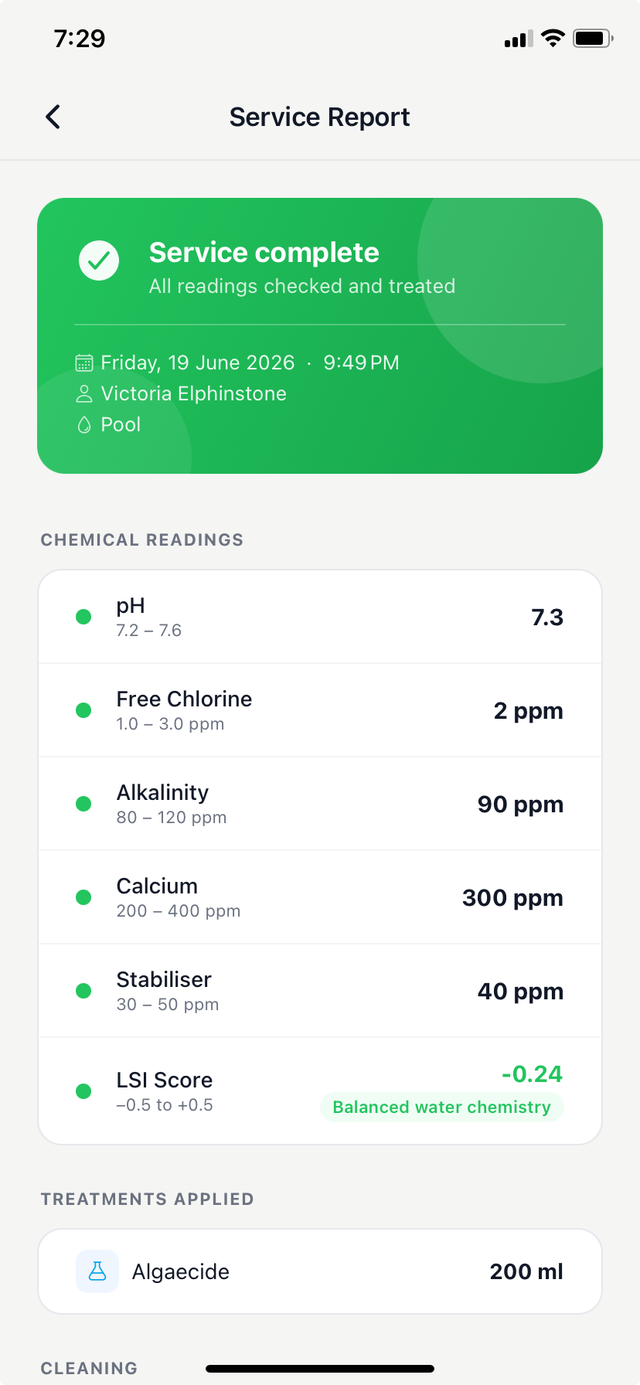
When you get a report
You'll receive a push notification when a new service report is available. Tap the notification to open it directly, or find it in the History tab.
What the report shows
- Date and time — when the service was completed.
- Technician name — who serviced your pool.
- Pool details — the pool that was serviced (useful if you have more than one).
- Chemical readings — all the readings your technician recorded, each with a colour indicator showing whether the value is in range.
- Technician note — a personal note from your technician about the visit.
- Cleaning record — a summary of the cleaning tasks completed during the visit, the pool condition rating, and whether algae was detected.
- Treatment record — the chemicals your technician applied, including recommended versus actual amounts used.
Understanding the colour indicators
Each chemical reading is colour-coded:
- Green — the reading is within the normal, healthy range. No action needed.
- Amber — the reading is borderline. Your technician is aware and will keep an eye on it.
- Red — the reading is outside the normal range. This is flagged for your technician and your pool company to follow up on.
If you'd like to understand what each reading means, see Understanding Water Chemistry.
Flagged readings
If one or more readings are in the red, the report is marked as flagged. This means your pool company is aware and your technician will address it — either at your next scheduled visit or sooner if the reading indicates an urgent issue. You don't need to take any action yourself unless your technician has specifically asked you to.